I have come to the end of the NET11 Internet Communications unit for SP1 and hence this will be my last post for my Learning Log. I have found the experience an extremely interesting one and have thouroughly enjoyed studying online.
NET11 has provided me with a valuable array of new skills which have greatly changed the way that I now approach using the internet. I am looking forward to continuing my online journey over the next three years re attaining a BA in Internet Studies.
Now time to submit NET11 Assignments 2 & 3.....
Thursday, May 24, 2007

Sunday, May 20, 2007
Essay Rumination
I have almost completed my essay for NET11 Assignment 3. I have found this a good exercise, not just in honing my rusty essay writing skills, but also in summarising and confirming to myself some of what I have learnt throughtout my studies in the NET11 unit.
I now perceive the internet quite differently compared to how I viewed it prior to first starting this course. The old addage of 'knowledge is power' is probably quite true in this sense, in that greater knowledge creates greater understanding thus allowing us to truly harness and utilize the internets full potential.
I now perceive the internet quite differently compared to how I viewed it prior to first starting this course. The old addage of 'knowledge is power' is probably quite true in this sense, in that greater knowledge creates greater understanding thus allowing us to truly harness and utilize the internets full potential.
Thursday, May 10, 2007
Module 5 Summary
Module 5 has provided me with, what I think, will be the basic structure for my essay. I will start off with a concept or two followed by an appropriate reference and then support it with a task, that I have undertaken in NET11, that will hopefully assist to substantiate my statements. So, on that note, time to get started.......
Thursday, May 3, 2007
Module 5 Preparing for 'Future Shock'
When I think of the term 'Future Shock' the first thing that comes to mind is Alvin Tofflers' book of the same name of which the phrase was originally taken from. Though first published in 1970, it's relevance remains and can be applied within the context of the internet and its ever changing environment. Toffler states in his introduction:
"......Change is the process by which the future invades our lives, and it is important to look at it closely, not merely from the grand perspectives of history, but also from the vantage point of the living, breathing individuals who experience it....."
and from a chapter appropriately named "The Death of Permanence":
"Future shock is a time phenomenon, a product of the greatly accelerated rate of change in society........a coherent image of the future can also shower us with valuable insights into today."
he also states:
"....between the pace of environmental change and the limited pace of human response. For future shock grows out of the increasing lag between the two."
As 'Advanced Internet Users', keeping abreast of the changes and new directions that the internet takes is crucial in preparing us for the future technologies that are rapidly evolving. We need to continually remain concious of these aspects of internet change if we are to successfully adapt to its environs, thus minimising the impact of any 'Future Shock'.
Web Resources:
"Info-Communication Concepts." http://webct.curtin.edu.au/SCRIPT/305033_a/scripts/serve_home (accessed May 03, 2007).
Reading Resources:
Toffler,Alvin. Future Shock. London: Pan Books Ltd, 1970.
"......Change is the process by which the future invades our lives, and it is important to look at it closely, not merely from the grand perspectives of history, but also from the vantage point of the living, breathing individuals who experience it....."
and from a chapter appropriately named "The Death of Permanence":
"Future shock is a time phenomenon, a product of the greatly accelerated rate of change in society........a coherent image of the future can also shower us with valuable insights into today."
he also states:
"....between the pace of environmental change and the limited pace of human response. For future shock grows out of the increasing lag between the two."
As 'Advanced Internet Users', keeping abreast of the changes and new directions that the internet takes is crucial in preparing us for the future technologies that are rapidly evolving. We need to continually remain concious of these aspects of internet change if we are to successfully adapt to its environs, thus minimising the impact of any 'Future Shock'.
Web Resources:
"Info-Communication Concepts." http://webct.curtin.edu.au/SCRIPT/305033_a/scripts/serve_home (accessed May 03, 2007).
Reading Resources:
Toffler,Alvin. Future Shock. London: Pan Books Ltd, 1970.
Module 5 Case Study: Peer to Peer
Peer to Peer (P2P) is not a technology that I am too familiar with. P2P brings to mind the the notorious programs such as Napster and Kazaa and hence, in the past, I have been wary of the particular technolgy involved. I have read varying reports of the adware etc that comes bundled with these programs and have always felt an uneasiness about using it. No doubt the 'bad press' about these programs have influenced my outlook of P2P.
P2P raises many issues such as:
Web Resources:
"Info-Communication Concepts." http://webct.curtin.edu.au/SCRIPT/305033_a/scripts/serve_home (accessed May 03, 2007).
P2P raises many issues such as:
- Copyright
- Security
- Social
- Technologial
- Communication
- Information
Web Resources:
"Info-Communication Concepts." http://webct.curtin.edu.au/SCRIPT/305033_a/scripts/serve_home (accessed May 03, 2007).
Tuesday, May 1, 2007
Module 5 Information Ecologies
Technology, information and communication are all interrelated and, within the context of the internet, technology is used to communicate information. The metaphor of the internet as an 'ecology' is but one of many ways that have been used to try and describe the intangible that is 'cyberspace'.
Analogies and metaphors provide an invaluable means for us, as internet users, to provide ourselves with a sense of meaning or understanding by assigning these comparisons to the internet. This in turn assists us to analize, comprehend and utilze the internet much more effectively. The questions posed to us in Module 5 can be answered much more easily when thinking of the internet in terms of say, an 'ecology'. Hence:
How might the metaphor of an ‘ecology’ impact on the way you think about, understand or use the Internet?
When I think of the internet as an 'ecology' I found James F. Moore's description of how executives should perceive themselves, as an apt analogy for how we also, as 'advanced internet users', can be thought of within the context of being part of the 'internet ecology':
"Executives need to think of themselves as part of organisms participating in an ecosystem in much the same way that biological organisms participate in a biological ecosystem."
Thinking of the internet in this way helps us to realise and can assist us in the knowledge that we are operating in a continually changing environment that requires an ongoing adaptive approach. We need to adapt our skills to the current internet environment and be prepared for expected future changes in a similar way to any other ecology or ecosystem. By being aware of the internets history, we can ascertain, to a certain extent, where the future of the internet may be heading, thus allowing us time to prepare and anticipate changes as they come along. Thinking of the internet as an ecosystem also helps us to be concious that the internet is not so much about operating as an individual but more so as part of a community of many participants cooperating together. Contributing to and taking from the internet in our various roles as internet users, from the viewpoint that though we are doing this as individulas, we are just but one of many parts that make up the whole and quite often, conciously or sub-conciously, our internet use can contribute and have an effect on the combined outcome in possible future directions that the internet may take.
How are the concepts ‘information’ and ‘communication’ understood within the framework of an ‘information ecology’?
The framework of information ecology, from a conceptual perspective of information and communication, puts an emphasis on people and how they create, distribute, understand and utilize information rather than the technology itself.
Why don’t we talk of a ‘communication ecology’?
Information ecology and communication ecology seem to be closely interrelated. Thus communication ecology, in my view, is more a part of the information ecology it communicates.
Reading Resources:
Moore,James F.. The Death of Competition: Leadership & Strategy in the Age of Business Ecosystems. Collins, May 21, 1997.
Web Resources:
Malhotra, Yogesh. "Information Ecology and Knowledge Management: Toward Knowledge Ecology for Hyperturbulent Organizational Environments." 2002.http://www.brint.org/KMEcology.pdf (accessed May 01, 2007).
"Info-Communication Concepts." http://webct.curtin.edu.au/SCRIPT/305033_a/scripts/serve_home (accessed May 01, 2007).
Analogies and metaphors provide an invaluable means for us, as internet users, to provide ourselves with a sense of meaning or understanding by assigning these comparisons to the internet. This in turn assists us to analize, comprehend and utilze the internet much more effectively. The questions posed to us in Module 5 can be answered much more easily when thinking of the internet in terms of say, an 'ecology'. Hence:
How might the metaphor of an ‘ecology’ impact on the way you think about, understand or use the Internet?
When I think of the internet as an 'ecology' I found James F. Moore's description of how executives should perceive themselves, as an apt analogy for how we also, as 'advanced internet users', can be thought of within the context of being part of the 'internet ecology':
"Executives need to think of themselves as part of organisms participating in an ecosystem in much the same way that biological organisms participate in a biological ecosystem."
Thinking of the internet in this way helps us to realise and can assist us in the knowledge that we are operating in a continually changing environment that requires an ongoing adaptive approach. We need to adapt our skills to the current internet environment and be prepared for expected future changes in a similar way to any other ecology or ecosystem. By being aware of the internets history, we can ascertain, to a certain extent, where the future of the internet may be heading, thus allowing us time to prepare and anticipate changes as they come along. Thinking of the internet as an ecosystem also helps us to be concious that the internet is not so much about operating as an individual but more so as part of a community of many participants cooperating together. Contributing to and taking from the internet in our various roles as internet users, from the viewpoint that though we are doing this as individulas, we are just but one of many parts that make up the whole and quite often, conciously or sub-conciously, our internet use can contribute and have an effect on the combined outcome in possible future directions that the internet may take.
How are the concepts ‘information’ and ‘communication’ understood within the framework of an ‘information ecology’?
The framework of information ecology, from a conceptual perspective of information and communication, puts an emphasis on people and how they create, distribute, understand and utilize information rather than the technology itself.
Why don’t we talk of a ‘communication ecology’?
Information ecology and communication ecology seem to be closely interrelated. Thus communication ecology, in my view, is more a part of the information ecology it communicates.
Reading Resources:
Moore,James F.. The Death of Competition: Leadership & Strategy in the Age of Business Ecosystems. Collins, May 21, 1997.
Web Resources:
Malhotra, Yogesh. "Information Ecology and Knowledge Management: Toward Knowledge Ecology for Hyperturbulent Organizational Environments." 2002.http://www.brint.org/KMEcology.pdf (accessed May 01, 2007).
"Info-Communication Concepts." http://webct.curtin.edu.au/SCRIPT/305033_a/scripts/serve_home (accessed May 01, 2007).
Monday, April 30, 2007
Week 10 Objectives
This week I am going to continue with Module 5, exploring the various topics. This will be in preparation for my essay which I will make a start on next week.
Wednesday, April 25, 2007
Module 5 Overview
Module 5 - Info-Communication Concepts, as the title denotes, is primarily concerned with the conceptual side of internet info-communication and, how we as advanced internet users, can best benefit from a sound understanding of the associated concepts. For myself, thinking about the internet in conceptual terms is, in a way, stepping out of the bubble and looking at the bigger picture so to speak. Understanding the internet as a whole while remaining concious of all that makes it what it is ie the smaller parts, is integral to becoming an 'advanced internet user'.
The module covers:
Information Ecologies which explore many of the concepts related to info-communication that we have studied in the previous modules and how technologies such as the internet can be likened to an ecosystem.
Peer to Peer which is used as a case study example to illustrate how one particular aspect of the internet and its use, will often require a sound knowledge and good understanding of its application if it is to be utilized effectively.
'Future Shock' which looks at what the future may hold and its impact on our understanding and use of the internet, as an ever evolving 'ecosystem'.
Web Resources:
"Info-Communication Concepts." http://webct.curtin.edu.au/SCRIPT/305033_a/scripts/serve_home (accessed April 25, 2007).
The module covers:
Information Ecologies which explore many of the concepts related to info-communication that we have studied in the previous modules and how technologies such as the internet can be likened to an ecosystem.
Peer to Peer which is used as a case study example to illustrate how one particular aspect of the internet and its use, will often require a sound knowledge and good understanding of its application if it is to be utilized effectively.
'Future Shock' which looks at what the future may hold and its impact on our understanding and use of the internet, as an ever evolving 'ecosystem'.
Web Resources:
"Info-Communication Concepts." http://webct.curtin.edu.au/SCRIPT/305033_a/scripts/serve_home (accessed April 25, 2007).
Week 9 Objectives
This week has been spent putting the final touches to my Resource Project for Assessment 1. I also hope to make a start on Module 5 in preparation for getting mu essay assignment underway.
Saturday, April 21, 2007
Module 4 Summary
This week, after exploring the concepts associated with Module 4 - Using the infosphere: taking & organising, I completed my last two annotations based on the Module 4 topic Web Searching & Evaluation. I linked them to Concept 32 - Virtually a Library? and Concept 33 - Information and Attention.
Module 4 assisted me in reassessing the way I organise and store information on my pc, especially bookmarks. I found some excellent tools that have streamlined and organized the process, particularly re cross browser synchronisation.
Module 4 assisted me in reassessing the way I organise and store information on my pc, especially bookmarks. I found some excellent tools that have streamlined and organized the process, particularly re cross browser synchronisation.
Wednesday, April 18, 2007
Module 4 Concept 29
As discussed in Concept 29 - The challenge of ‘fast’ data, having awareness of how information continually evolves on the internet, opposed to a static paper-based information source, can assist us in weighing up the pros and cons of both, with the ultimate goal of utilizing whichever is more appropriate for our prupose. I think Wikipedia is a prime example of 'fast' data - seemingly ever changing, able to be updated and modified as the need arises, almost disposable in a way.
In this technological age where everything is instant and on demand, information itself is more accessible and editable than it ever has been before. One needs to take various factors into consideration when thinking of online information - credibilty, accessibilty, relevance and currency. These factors are not always apparent when it comes to the information that we access online. However, as opposed to static information, material on the web is indeed much faster.
Personally, I find the internet more as an information gathering/reference tool. Once I have the required information and if it is in depth, then I prefer to read it in static form.
Web Resources:
"Internet Communications Concepts Document." http://webct.curtin.edu.au/SCRIPT/305033_a/scripts/serve_home (accessed April 18, 2007).
In this technological age where everything is instant and on demand, information itself is more accessible and editable than it ever has been before. One needs to take various factors into consideration when thinking of online information - credibilty, accessibilty, relevance and currency. These factors are not always apparent when it comes to the information that we access online. However, as opposed to static information, material on the web is indeed much faster.
Personally, I find the internet more as an information gathering/reference tool. Once I have the required information and if it is in depth, then I prefer to read it in static form.
Web Resources:
"Internet Communications Concepts Document." http://webct.curtin.edu.au/SCRIPT/305033_a/scripts/serve_home (accessed April 18, 2007).
Module 4 Concept 32
When thinking about the Internet as a Virtual Library as per the question raised in Concept 32 - Virtually a Library?, it would seem to be a difficult analogy to liken the two. Libraries have their own organised systems and hence allow people to search, normally, with pin-point accuracy for what they are looking for. As the internet is a decentralised entity in it's own right, there is no definitive categorization in place, hence the need for a more skillful approach to searching for the information that one is endeavoring to find.
Those who publish and make information available on the web, all have many differing and contrasting ways in which they can make their sites, blogs, articles etc available for searching and locating. Therefore, a wide and varied knowledge of searchable techniques and tools are required, quite often requiring a different approach for each search, dependant on the searchers goal and the type of information they are seeking. Being aware of how to maximise the categorizability of information for publishing on the internet, is important to attracting as wider audience as possible and in making the information easier to locate.
Web Resources:
"Internet Communications Concepts Document." http://webct.curtin.edu.au/SCRIPT/305033_a/scripts/serve_home (accessed April 18, 2007).
Those who publish and make information available on the web, all have many differing and contrasting ways in which they can make their sites, blogs, articles etc available for searching and locating. Therefore, a wide and varied knowledge of searchable techniques and tools are required, quite often requiring a different approach for each search, dependant on the searchers goal and the type of information they are seeking. Being aware of how to maximise the categorizability of information for publishing on the internet, is important to attracting as wider audience as possible and in making the information easier to locate.
Web Resources:
"Internet Communications Concepts Document." http://webct.curtin.edu.au/SCRIPT/305033_a/scripts/serve_home (accessed April 18, 2007).
Module 4 Concept 33
As discussed in Concept 33 - Information and Attention, when one is writing an evaluation of a website, online article etc, it is important to make sure that what is written is done so in such a way as to grab the readers attention. Giving the the reader enough succinct and well presented, relevant information allows them to form a quick opinion as to whether the source described is appropriate to what they are indeed searching for. The same can be said of websites or even blogs. Many factors can play a crucial role as to whether a visitor stays or goes within the first 10 seconds.
Web Resources:
"Internet Communications Concepts Document." http://webct.curtin.edu.au/SCRIPT/305033_a/scripts/serve_home (accessed April 18, 2007).
Brown, John S & Duguid, Paul. "The Social Life of Documents." May 6, 1996.http://www.firstmonday.dk/issues/issue1/documents/ (accessed April 18, 2007).
John Brown and Paul Duguid make some interesting points below in their article 'The Social Life of Documents':
"The French sociologist Bruno Latour points out that a primary characteristic of documents is their mobility (the other is their immutability). Documents quickly pass beyond the reach and protection of their maker and have to fend for themselves. A central challenge, then, is to engage the interests of the community they are intended for. As the number of documents multiplies dramatically and their reach is extended by information technology, the challenge of engaging an intended audience grows too. The swelling number of documents and the shrinking amount of time available for each one raises the problem of what Richard Lanham calls the "economy of attention," evident as much in the diverse envelopes of junk mail, each with a separate strategy for getting read, as anywhere else.......
........The central issue here is for the intended audience to be able to recognize documents intended for them.......
......In an increasingly crowded attention economy, the challenge of reaching an intended audience accounts for the demand for sophisticated Web-page designers and the importance of autonomous agents on the net that can plant links in strategic sites. Despite this work, with most links and pages, it's still very hard even to make even a reasonable guess at the intended audience. This difficulty may reflect an implicit assumption by many that documents have universal appeal or that content alone will marshal an audience. Yet if the overall form appears unclear, few will linger over the content, especially given the ease with which links allow people to pass by".
I have endeavoured to remain concious of these aspects while preparing my Resource Project annotations, by including all the relevent information in a short block of text with highlighted headings and links where appropriate. The hope is that readers can make a quick, informed judement on the relevance of the annotation to their search.
"The French sociologist Bruno Latour points out that a primary characteristic of documents is their mobility (the other is their immutability). Documents quickly pass beyond the reach and protection of their maker and have to fend for themselves. A central challenge, then, is to engage the interests of the community they are intended for. As the number of documents multiplies dramatically and their reach is extended by information technology, the challenge of engaging an intended audience grows too. The swelling number of documents and the shrinking amount of time available for each one raises the problem of what Richard Lanham calls the "economy of attention," evident as much in the diverse envelopes of junk mail, each with a separate strategy for getting read, as anywhere else.......
........The central issue here is for the intended audience to be able to recognize documents intended for them.......
......In an increasingly crowded attention economy, the challenge of reaching an intended audience accounts for the demand for sophisticated Web-page designers and the importance of autonomous agents on the net that can plant links in strategic sites. Despite this work, with most links and pages, it's still very hard even to make even a reasonable guess at the intended audience. This difficulty may reflect an implicit assumption by many that documents have universal appeal or that content alone will marshal an audience. Yet if the overall form appears unclear, few will linger over the content, especially given the ease with which links allow people to pass by".
I have endeavoured to remain concious of these aspects while preparing my Resource Project annotations, by including all the relevent information in a short block of text with highlighted headings and links where appropriate. The hope is that readers can make a quick, informed judement on the relevance of the annotation to their search.
Web Resources:
"Internet Communications Concepts Document." http://webct.curtin.edu.au/SCRIPT/305033_a/scripts/serve_home (accessed April 18, 2007).
Brown, John S & Duguid, Paul. "The Social Life of Documents." May 6, 1996.http://www.firstmonday.dk/issues/issue1/documents/ (accessed April 18, 2007).
Saturday, April 14, 2007
Week 8 Objectives
This week I will explore the concepts, associated with Module 4, in more detail and include my reflections in my learning log.
On the practical side, I found the Module 4 tasks to be an instigator in changing the way I managed/organised some of the information on my pc. I find now that my bookmarks are now much easier to navigate and access in both IE and Firefox, after experiemting with the various organisational tools that are available. Also, gathering information from the web has become much simpler as I am now using programs such as Zotero, which ultimately, are a great time saver.
On the practical side, I found the Module 4 tasks to be an instigator in changing the way I managed/organised some of the information on my pc. I find now that my bookmarks are now much easier to navigate and access in both IE and Firefox, after experiemting with the various organisational tools that are available. Also, gathering information from the web has become much simpler as I am now using programs such as Zotero, which ultimately, are a great time saver.
Module 4 Evaluating the Web Task
For this Module 4 task, Evaluating the Web, I chose Phil Bradley's article from his website as a source on which to base an annotation, based on the three sources located in the previous task. I have included the annotation below:
Internet Tools for the Advanced Searcher
Link: www.philb.com/adint.htm
Bradley, Phil. "Internet Tools for the Advanced Searcher.." Last updated January 20, 2005.http://www.philb.com/adint.htm (accessed April 13, 2007).
For those with a basic understanding or those already well versed in internet search techniques, but wish to refine their skills further, Phil Bradley's website provides an excellent information resource on the subject of advanced search methods and the tools associated with locating information on the internet. Bradley provides an informative synopsis on the ways, means and tactics that can transform the average searching experience into a much more efficient and expedient process. Some of the search categories he discusses include search engines, virtual libraries, intelligent agents, weblogs and the associated search techniques employed for each. Every search topic is described in adequate detail, complete with relevant points and explanations on how a particular search tool/method operates and when/how it should be utilized. Appropriate links are incoporated for each topic so that the reader can utilize any technique/tool that Bradley has discussed. The site itself is straight forward, easy to navigate and incorporates mainly text based information which includes other internet related topics that may be of additional interest to site visitors. Last updated in January, 2005, the information presented remains valid and is relevent in keeping with todays search technologies and techniques. Phil Bradley is an information specialist and internet consultant. He has written many books and articles on internet related topics, has frequent public speaking engagements and is a teacher on internet related subjects. In addition, he is a Search Engine Optimizer and has often been referred to as the 'UK Search Guru'.
Comparing the annotation that I have prepared above, to the snapshot of the Phil Bradley website that I took from the previous task, I would be more inclined to utilize the snapshot, simply due to the fact that I am already familiar with the site and hence would use the snapshot as a quick reference to grab information such as web site address, web page preview or to access the site directly.
In terms of external users, the annotation would be the most appropriate source of reference, due to the fuller description of Bradley's website article pertaining to internet search skills/tools from which any external user could make an informed decision as to its relevance and credibility with respect to using it as a resource. If users had not been visitors to the website previously, the snapshot would provide them only with the basic details such as website address, a copy of the web page and a list of the contents of the particular article.
Web Resources:
Bradley, Phil. "Internet Tools for the Advanced Searcher." Last updated January 20, 2005.http://www.philb.com/adint.htm (accessed April 13, 2007).
Internet Tools for the Advanced Searcher
Link: www.philb.com/adint.htm
Bradley, Phil. "Internet Tools for the Advanced Searcher.." Last updated January 20, 2005.http://www.philb.com/adint.htm (accessed April 13, 2007).
For those with a basic understanding or those already well versed in internet search techniques, but wish to refine their skills further, Phil Bradley's website provides an excellent information resource on the subject of advanced search methods and the tools associated with locating information on the internet. Bradley provides an informative synopsis on the ways, means and tactics that can transform the average searching experience into a much more efficient and expedient process. Some of the search categories he discusses include search engines, virtual libraries, intelligent agents, weblogs and the associated search techniques employed for each. Every search topic is described in adequate detail, complete with relevant points and explanations on how a particular search tool/method operates and when/how it should be utilized. Appropriate links are incoporated for each topic so that the reader can utilize any technique/tool that Bradley has discussed. The site itself is straight forward, easy to navigate and incorporates mainly text based information which includes other internet related topics that may be of additional interest to site visitors. Last updated in January, 2005, the information presented remains valid and is relevent in keeping with todays search technologies and techniques. Phil Bradley is an information specialist and internet consultant. He has written many books and articles on internet related topics, has frequent public speaking engagements and is a teacher on internet related subjects. In addition, he is a Search Engine Optimizer and has often been referred to as the 'UK Search Guru'.
Comparing the annotation that I have prepared above, to the snapshot of the Phil Bradley website that I took from the previous task, I would be more inclined to utilize the snapshot, simply due to the fact that I am already familiar with the site and hence would use the snapshot as a quick reference to grab information such as web site address, web page preview or to access the site directly.
In terms of external users, the annotation would be the most appropriate source of reference, due to the fuller description of Bradley's website article pertaining to internet search skills/tools from which any external user could make an informed decision as to its relevance and credibility with respect to using it as a resource. If users had not been visitors to the website previously, the snapshot would provide them only with the basic details such as website address, a copy of the web page and a list of the contents of the particular article.
Web Resources:
Bradley, Phil. "Internet Tools for the Advanced Searcher." Last updated January 20, 2005.http://www.philb.com/adint.htm (accessed April 13, 2007).
Friday, April 13, 2007
Module 4 Organising Search Info Task
For this task, the three sources that I chose from the previous Boolean search task were:
Phil Bradley: Internet Tools for the Advanced Searcher:

Advanced Internet Users Tutorial - CIESE:

Users and Internet Skills:

For this task I downloaded 2 Pane Bookmarks. I felt it provided a good organizational structure for my bookmarks when using Firefox. I then saved the three sources from the Boolean task in a sub-folder titled 'Module 4' within a main folder titled 'NET11' which had already been setup previously.
I have also downloaded Zotero which has proved to be a great tool for capturing details from webpages, which can be then be stored on my computer to be utilized at leisure. Zotero is able to save url's, take snapshots of pages, short abstracts to describe the website and much more. I logged and saved all the information from the three sources for this task. As per the attached screenshots above and below, this information has been stored on my pc and can be accessed at any time. I find Zotero very easy to use and the saved information is easily accessible both on and offline.

This week I have spent much of my time installing and uninstalling add-ons, plug-ins and extensions, mainly pertaining to bookmark organisation and browsing enhancements, in the hope of finding one that suited what I was looking for. This module has resulted in my re-assessment of how I have been managing the information that I use from the internet and how I can better utilize software tools for better organization. The NET11 Webct discussion board also proved helpful re particular add-ons that other students had found helpful.
Web Resources:
Bradley, Phil. "Internet Tools for the Advanced Searcher.." Last updated January 20, 2005.http://www.philb.com/adint.htm (accessed April 13, 2007).
CIESE, "Advanced Internet User Tutorial." 2000.http://www.k12science.org/tutorials/advanced/index.html (accessed April 13, 2007).
Igun, Stella E. "Users and Internet Skills:." Winter, 2005.http://southernlibrarianship.icaap.org/content/v06n03/igun_s01.htm (accessed April 13, 2007).
Phil Bradley: Internet Tools for the Advanced Searcher:

Advanced Internet Users Tutorial - CIESE:

Users and Internet Skills:

For this task I downloaded 2 Pane Bookmarks. I felt it provided a good organizational structure for my bookmarks when using Firefox. I then saved the three sources from the Boolean task in a sub-folder titled 'Module 4' within a main folder titled 'NET11' which had already been setup previously.
I have also downloaded Zotero which has proved to be a great tool for capturing details from webpages, which can be then be stored on my computer to be utilized at leisure. Zotero is able to save url's, take snapshots of pages, short abstracts to describe the website and much more. I logged and saved all the information from the three sources for this task. As per the attached screenshots above and below, this information has been stored on my pc and can be accessed at any time. I find Zotero very easy to use and the saved information is easily accessible both on and offline.

This week I have spent much of my time installing and uninstalling add-ons, plug-ins and extensions, mainly pertaining to bookmark organisation and browsing enhancements, in the hope of finding one that suited what I was looking for. This module has resulted in my re-assessment of how I have been managing the information that I use from the internet and how I can better utilize software tools for better organization. The NET11 Webct discussion board also proved helpful re particular add-ons that other students had found helpful.
Web Resources:
Bradley, Phil. "Internet Tools for the Advanced Searcher.." Last updated January 20, 2005.http://www.philb.com/adint.htm (accessed April 13, 2007).
CIESE, "Advanced Internet User Tutorial." 2000.http://www.k12science.org/tutorials/advanced/index.html (accessed April 13, 2007).
Igun, Stella E. "Users and Internet Skills:." Winter, 2005.http://southernlibrarianship.icaap.org/content/v06n03/igun_s01.htm (accessed April 13, 2007).
Module 4 Boolean Search Task
Taking the same key words of your last search, think about how you would best search for the following:


- the biggest number of hits relating to these key words.
- sources relating to skills-based information on these key words.
- information coming only from university sources.
Discuss your strategies with the class and record the exact search terms you used in your learning log.
For the "biggest number of hits relating to advanced internet users" I used Google with the search terms: advanced and internet and users. This returned 279,000,000 hits. I noticed that Google states that the "and" search term is unnecessary as they "include all search terms by default". However, when I tried to search using just: advanced internet users, Google only returned 118,000,000 hits.
Using "and" when searching key words returns results that include all three words in each hit. The relevance for many of the results are questionable when thinking about the context in which the term is searched for. Hence, this is best suited for broader, non-specific types of seraches.For the "sources relating to skills-based information on these key words", I once again used google with the search terms: advanced and internet and users + skills. This returned 15,700,000 hits.
I used and once again so as all three words would be included in each hit. By adding the + for the word "skills", this ensured that the hits for the three words would be returned within the context of skills associated with advanced internet users.
I find that the + is useful when searching a topic/subject within a certain context.
For the "information coming only from university sources", I used the meta search engine Ixquick. I utilized the expert search option which allowed me to stipulate edu as the domain name so that the results returned would be academic in nature. I also ensured that the search would include all three words. The search returned the top 30 hits from a total of 180,274 results.
Using advanced search options can provide much more relevant search results. Combined with using a meta search engine, the search itself becomes both expedient and more efficient.
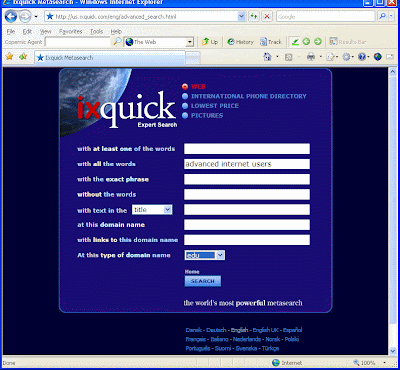

Using the correct search terms, as has been demonstrated with this Boolean task, can make a huge difference in the relevance and amount of results that one receives. I also found that it greatly assisted in returning results that were in context to what I was searching for. I posted my searching methods for this task on the NET11 Webct discussion board.
Web Resources:
Cohen, Laura. "Boolean Searching on the Internet." Last update May, 2006.http://www.internettutorials.net/boolean.html (accessed April 12, 2007).
"Using the Infosphere: Taking & Organising."http://webct.curtin.edu.au/SCRIPT/305033_a/scripts/serve_home (accessed April 12, 2007).
Thursday, April 12, 2007
Module 4 Search Engine Task
1. Choose your most commonly used internet search engine and do a search for the words: advanced internet users. Record the first hit and number of hits in your learning log.

For the first part of this task I used Google, being the search engine that I utilize most often. The search for Advanced Internet Users returned a total of 118,000,000 hits!

Google - first 5 hits:
Advanced Internet Users Tutorial - CIESE
- Advanced User's Internet Training Resources
Advanced Internet Users, School of Continuing Education ...
http://newsroom.cisco.com/dlls/global/asiapac/news/2005/pr_09-21.html
StatCounter Free invisible Web tracker, Hit counter and Web stats
2. Using copernicus or similar, set it up to search at least three search engines (including one that will search the 'deep web') and repeat eactly the same search.
Record the number of hits in your learning log, and compare to your first search. What differences did you notice? Why? Which search, on first glance gave you the most promising results?
For the second part of this task, I used the Copernic Agent. It was setup to utilize 12 search engines. The search for Advanced Internet Users returned a mere 49 hits.
Copernic Agent - first 5 hits:
Advanced Internet Users Tutorial - CIESE
Windows 98 Using Windows 98: Exploring the Internet-Tips and Tricks for Advanced Users
Advanced Internet Users, School of Continuing Education ...
Debian Networking for Basic and Advanced Users - Debian Admin
Comparing the respective search results from Google and the Copernic Agent, there was a distinct difference in the number of hits that were returned - Google 118,000,000 and Copernic 49. Quite a contrast and hence this begs the question - why such a variance between search results? Prior to starting Module 4, I would have assumed that the Google search was superior in that it's search had been much more thorough, based on the amount of hits it returned. However, having learned about the advantages of Meta search tools such as Copernic and on closer inspection of the results, Copernic returned the most relevant results for the search, hence the smaller number. Copernic is much more thorough in that it utilizes many search engines and searches on a much deeper level, for the most relevent results. This, opposed to single engine searches such as Google, which tend to return pretty much everything whether it be relevant or not.
I think search tools such as Copernic have the potential to save time when it comes to sifting through numerous search results based on more specific searches.
Web Resources:
"Using the Infosphere: Taking & Organising."http://webct.curtin.edu.au/SCRIPT/305033_a/scripts/serve_home (accessed April 12, 2007).
The Ohio State University Libraries, "Using Web Search Tools > Overview - Key Ideas." Last revised July 19, 2005.http://gateway.lib.ohio-state.edu/tutor/les5/ (accessed April 12, 2007).
The Ohio State University Libraries, "Specialized Databases > Overview - Key Ideas." Last revised July 19, 2005.http://gateway.lib.ohio-state.edu/tutor/les5/ (accessed April 12, 2007).
Module 4 Tools/Plug-ins Task
In your learning log record which programs you downloaded and note which (if any) facets you think might prove useful.
Bookmark Buddy for Windows:
For this task, I firstly downloaded Bookmark Buddy for Windows. I found it quite a useful tool in that it assisted in categorizing bookmarks/favorites in a well-ordered fashion. It also proved useful with respect to backing up/restoring bookmarks when they were accidently lost. During this task, I inadvertently deleted my bookmarks while experimenting with some other bookmark software - Zinkmo. The Bookmark Buddy was able to restore all of these so proved to be quite valuable.
While completing this task, I also found an additional add-on for the Firefox Browser called PlainOldFavorites which allowed me to add an IE Favorites menu to the Firefox toolbar. This is convenient as it does not involve having to manually update the links in FF from IE. However, what I really would have found useful, is an offline seamless automatic integration of bookmark synchronization between Firefox and IE eg add a bookmark to IE and the bookmarks automatically update in FF. Most of the tools available were much more involved so ultimately I settled for the above mentioned 'favorites' add-on in addition to the Bookmark Buddy.
Bookmark Buddy for Windows:
For this task, I firstly downloaded Bookmark Buddy for Windows. I found it quite a useful tool in that it assisted in categorizing bookmarks/favorites in a well-ordered fashion. It also proved useful with respect to backing up/restoring bookmarks when they were accidently lost. During this task, I inadvertently deleted my bookmarks while experimenting with some other bookmark software - Zinkmo. The Bookmark Buddy was able to restore all of these so proved to be quite valuable.
While completing this task, I also found an additional add-on for the Firefox Browser called PlainOldFavorites which allowed me to add an IE Favorites menu to the Firefox toolbar. This is convenient as it does not involve having to manually update the links in FF from IE. However, what I really would have found useful, is an offline seamless automatic integration of bookmark synchronization between Firefox and IE eg add a bookmark to IE and the bookmarks automatically update in FF. Most of the tools available were much more involved so ultimately I settled for the above mentioned 'favorites' add-on in addition to the Bookmark Buddy.

WebCopier for Windows:
For the second part of the Module 4 Tools/Plug-ins task I downloaded the WebCopier trial version. I did not find the software that straight forward and it took sometime to learn how to download a full website. However, once I grasped how the tool worked I was able to download the website without any problems. Some of the website content was not viewable after the download, but the main content was available to peruse at leisure.

I then downloaded a similar program, Website Ripper Copier, in the hope that it might prove to be a little more intuitive and straight forward, which it proved to be.

After completing this task, I discovered that website copiers are extremely useful. Being able to download a website to my laptop and then view the pages while offline has the potential to provide a convenient way to surf the net when there is no internet connection available eg when travelling for instance. I can forsee myself utilizing web copier tools with my studies when I am 'on the move'.
Monday, April 9, 2007
Module 4 Overview
This is an overview of Module 4: Using the Infosphere: Taking & Organising. This module is mainly concerned with how to choose the appropriate tools for retrieving information including its organisation and storage. The second part of the module deals with skills corresponding to searching for material on the web and, in addition, to assessing the quality of that material as to its credibilty and relevance in relation to the search objective.
Retrieving:
When dealing with information available from the web, certain tools are utilized and can be categorized as follows:
- Tools/software that allow the user to read certain file formats or view information/material.
- Tools/software that assist in the organisation and storeage of information.
- Tools/software that deal with security issues.
Most of the tools that were discussed in Module 4 are ones that I already utilize. Among the media players, I also have Winamp which I downloaded at one stage, due to none of the other players recognizing the file format. It plays most file formats.
Searching:
To be able to search the web effectively and productively, it is essential to be aware of the following:
- Have a greater awareness and knowledge of the varying 'modus operandi' that are employed when searching the internet.
- A better understanding of the differing kinds of sources available to locate information.
- Knowing what types of information resources are available in the first instance can prove to make the search a much more expedient process.
My searching skills in the past have, for the majority of searches, been confined to using Google. On occasion I have utilized other methods, but have tended to stick with what I know. I am looking forward to refining my skills within this area, while studying Module 4, hence widening my 'horizons' so to speak thus enabling me to locate information much more efficiently.
Evaluating:
Having the ability to discriminate effectively between types of information and there sources is critical with respect to assessing if the source and material is credible, relevent, authoritive etc.
It was interesting to note the WebCT discussion re using Wikipedia as an annotated resource. It was a good exercise in that it assisted me to be more discriminating with the types of information and sources that I was utilizing for my Resource Project.
Web Resources:
"Using the Infosphere: Taking & Organising."http://webct.curtin.edu.au/SCRIPT/305033_a/scripts/serve_home (accessed April 9, 2007).
Subscribe to:
Posts (Atom)